BIM model review vs BIM authoring: what’s the difference?
Quick answer: BIM authoring is the process of creating and changing the model. BIM model review is the process of examining that model to understand the design, verify information, discuss issues and support decisions. The two workflows use much of the same project data, but they serve different responsibilities and do not require the same tools.
A BIM model can be used in two very different ways.
One person opens it because a wall needs to move, a system needs to be rerouted or the documentation needs to be updated.
Another opens the same model because they need to understand an issue, inspect an element, take a measurement or decide whether a proposed solution works.
Both are working with BIM information. Only one of them is authoring the model.
That distinction sounds simple, but it has an important consequence: not everyone who needs to work with a BIM model needs a BIM authoring environment.
What BIM authoring actually means
BIM authoring is where the design is created and maintained.
Authoring tools such as Revit, Archicad, Tekla Structures and similar discipline-specific applications are built around the ability to change the project itself. A user may create elements, edit geometry, define parameters, manage relationships, produce drawings or schedules, and keep those outputs coordinated as the design develops.
In an authoring workflow, changing one object may affect many other parts of the project.
Move a wall and dimensions may change. Move a floor opening and the structural model may need to respond. Change a family or object type and every instance may be affected. Update a system and drawings, schedules or quantities may need to follow.
That is why authoring applications are powerful and complex. They are not simply 3D viewers with more buttons. They are environments for producing and maintaining the source information from which project deliverables are created.
Typical authoring work includes:
- creating and modifying model elements;
- defining object types, parameters and relationships;
- producing drawings, schedules and other documentation;
- managing discipline-specific design logic;
- coordinating changes inside the authoring model;
- using specialist extensions, scripts and automation;
- preparing information for exchange or delivery.
For the people responsible for creating the design, this functionality is essential.
For everyone else, much of it may be unnecessary.
What BIM model review means
Model review starts with a different question.
Instead of “How do I change the model?”, the reviewer is usually asking something closer to:
- What is here?
- Where is the problem?
- What does this element represent?
- How does this area relate to another discipline?
- Is there enough space?
- What was discussed about this issue?
- Does the proposed solution make sense?
The reviewer needs access to the project information, but not necessarily permission or tools to redesign it.
A useful review environment therefore focuses on inspection rather than creation. It may provide tools for navigation, sections, measurements, object properties, visibility control, saved viewpoints, selections, markups and issue management.
The model remains the source of context. The reviewer works around it rather than authoring inside it.
This makes model review relevant to a much wider group than BIM modelers alone: BIM coordinators, project managers, site engineers, consultants, contractors, clients and other participants who need to understand the project without becoming authors of the design.
Review is not just looking at a 3D model
The word viewer can make model review sound passive.
It is not.
A useful review session may involve isolating a group of objects, cutting a section through a congested area, checking a property, measuring a clearance, opening a saved viewpoint or following a BCF issue to the exact location where a decision is needed.
The reviewer may never modify the source model, but they can still do meaningful project work.
Consider a mechanical opening through a concrete wall.
The structural engineer may author the wall. The MEP designer may author the duct. A coordinator reviewing the combined information may need to determine whether the opening exists, whether its location matches the service route and whether an issue has already been raised.
The coordinator does not need to remodel either discipline to answer those questions.
They need the right information, presented in a way that makes inspection efficient.
That is the central difference between authoring and review: one changes the project information; the other interrogates it.
The same model can support very different jobs
The software requirement should follow the responsibility, not simply the fact that someone is involved in a BIM project.
A designer responsible for developing the architectural model needs authoring tools.
A BIM coordinator may need both authoring knowledge and dedicated coordination or review tools, depending on the task.
A site engineer may need to inspect geometry, dimensions, object data and issues without changing the design model.
A project manager may need to understand a prepared view, review an issue and follow its status.
A client may only need enough model access to understand the design decision being discussed.
These users are not working with “less important” BIM. They are using the same project information for different purposes.
Giving every role the same software does not automatically create a better workflow. Sometimes it simply gives a user hundreds of commands that have nothing to do with the decision they are responsible for making.
Why full authoring software can be the wrong review environment
Using an authoring application for model review is not inherently wrong. In many teams it is completely normal, especially when the reviewer already works in that application every day.
The problem appears when authoring software becomes the default requirement for people who do not author models.
A specialist application may introduce barriers that are unrelated to the review itself:
- a paid license may be required;
- the correct application and version may need to be installed;
- access may depend on company-managed hardware;
- the interface may assume knowledge the reviewer does not have;
- project permissions may be broader than the reviewer actually needs;
- a large authoring environment may take longer to learn than the review task justifies.
None of these make authoring software bad. They simply reflect what it was designed to do.
A structural modeling application should prioritize structural modeling. An architectural authoring tool should prioritize architectural design and documentation. A review tool can prioritize something else: getting the right project information in front of the right person with as little friction as possible.
A good review tool should preserve context
Removing authoring functions should not mean reducing BIM to a screenshot.
The value of model review comes from keeping the information connected to the model.
A screenshot can show what someone saw, but it cannot easily answer what object was selected, what its properties were, what was hidden around it or where the same issue sits in three-dimensional space.
A useful review workflow should preserve enough context for the next person to understand the problem without rebuilding the entire investigation from scratch.
That can include:
- the relevant model or federated models;
- the camera position;
- visible and hidden elements;
- section planes;
- selected objects;
- measurements and markups;
- object properties;
- issue descriptions, comments and status information.
This is where prepared views and issue viewpoints become especially valuable. A reviewer can begin from the intended context and then explore further if needed.
The goal is not to lock everyone to one screenshot. It is to give them a reliable starting point.
Where IFC fits into model review
IFC is particularly useful when review needs to happen outside the original authoring environment.
The format can carry model geometry, object structure, classifications, properties and relationships between different applications. That makes it possible to publish information from an authoring tool and review it in software that does not need to understand the original proprietary project file.
This separation is useful for an important reason: the review copy and the authoring model serve different purposes.
The authoring team continues to develop the source model in its native environment. Reviewers can inspect the published IFC without needing the same authoring application or the same file format.
IFC does not remove the need for good publishing and coordination procedures. It does, however, create a neutral information layer that can be consumed by many different tools.
Read How to open an IFC file without Revit for a practical look at accessing IFC outside an authoring application.
Where BCF fits into model review
IFC gives the reviewer the model information. BCF gives the review process a way to communicate about it.
A BCF issue can identify a topic, store comments and status information, and include a viewpoint that directs another user to the relevant place in the model.
That makes BCF a natural bridge between review and authoring.
A typical loop may look like this:
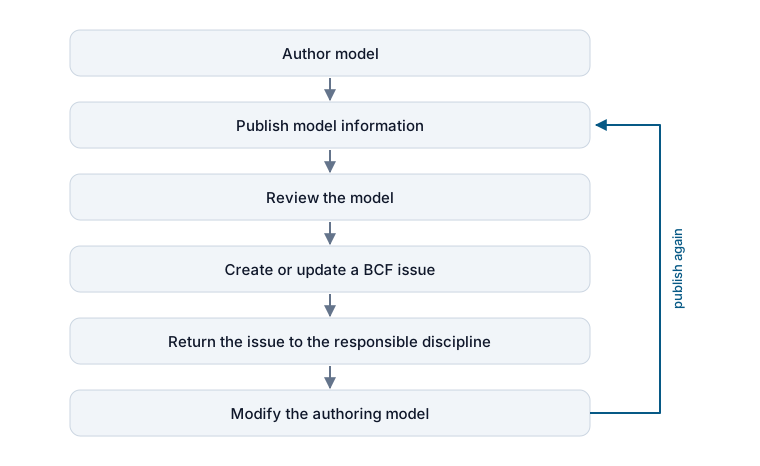
The review tool does not need to edit the wall, duct or beam itself. It needs to communicate clearly enough that the responsible author can make the right change in the correct environment.
This is why BCF is more than a collection of screenshots. It can preserve the context of the discussion while allowing each discipline to continue using the tools designed for its own work.
Read IFC vs BCF: what’s the difference? for a closer look at how model exchange and issue exchange complement each other.
Model review should feel safe to explore
There is another practical difference between authoring and review: exploration should be low-risk.
A reviewer should be able to rotate the model, isolate elements, change visibility, open a section or inspect a saved selection without wondering whether they are modifying the source project.
That matters particularly for people who are not BIM specialists.
During a coordination meeting, for example, one person may control the shared model while several other participants follow the discussion. If each participant also has access to a review copy, they can inspect the same area independently, reopen a prepared view or check an adjacent element without taking control of the presentation.
The same principle applies before the meeting. Prepared views, selections and issues can give participants a structured starting point, while still allowing them to explore the project at their own pace.
This does not turn every participant into a model author.
It gives them enough access to participate more actively in the decisions around the model.
Authoring and review work best as separate but connected layers
The distinction between authoring and review is not an argument for separating teams or creating more software silos.
It is the opposite.
A healthy BIM workflow allows different tools to participate in the same information process without forcing every task into one application.
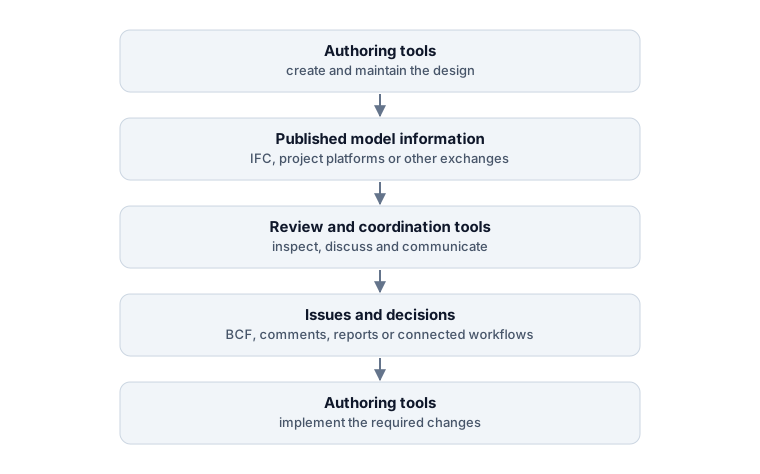
The important part is not which application sits in each box. The important part is that information can move between them without losing the context needed for the next decision.
That is also why open standards matter. IFC can make model information less dependent on the authoring application, while BCF can make coordination issues less dependent on the review tool in which they were created.
Focus the software on the responsibility
A useful way to choose BIM software is to stop asking whether a person is a “BIM user.”
That category is too broad.
Ask instead what that person is responsible for doing.
If they create or modify the design, they need an authoring environment appropriate to their discipline.
If they need to understand, inspect, measure, coordinate or comment on published information, a review environment may be enough.
If they do both, they may need both.
This is also the side of the workflow Bimlyte is designed around. It provides a browser-based environment for opening IFC models, reviewing BCF issues and working with prepared project context such as saved views and selections. It does not try to replace Revit, Archicad, Tekla or other authoring applications.
The distinction is deliberate.
The goal of model review is not to give everyone the ability to change the model. It is to give everyone who needs the model enough access to understand it and contribute to the decisions around it.
You can open Bimlyte to review IFC models and BCF issues directly in your browser without installing specialist BIM authoring software or creating an account. Project files are processed locally on your device.