Why browser-based BIM tools are becoming more popular
Quick answer: Browser-based BIM tools are growing because many BIM tasks do not involve creating or editing the model. They involve opening it, finding an object, checking information, reviewing an issue, or sharing a result. Modern browsers can now process complex files, display serious 3D graphics, store project data locally, and connect specialized applications through open standards and APIs. Desktop BIM remains essential, but it no longer has to be the entry point for every BIM task.
A BIM model may be created by a relatively small group of specialists, but the information inside it is used across the project.
It supports coordination meetings, construction reviews, design approvals, cost discussions, handovers, and everyday technical questions. Many of the people involved will never edit a wall, build a parametric family, or produce a drawing sheet.
This creates a mismatch. BIM authoring software is designed for creating and maintaining models, while a much wider group often needs only selected information from them.
Browser-based BIM tools are becoming more popular because they address that mismatch. They make specific BIM workflows easier to reach without assuming that every user needs a complete authoring environment.
Many BIM tasks do not require authoring software
Once a model enters the wider project, the questions are often practical:
- Where is the element described in this issue?
- What type, material, or classification does it have?
- Which version contains the latest change?
- Can a section be created through this area?
- What needs to be corrected before the next review?
- Can the issue list be exported for a meeting?
These are BIM tasks, but they are not model-authoring tasks.
A browser tool can therefore be designed around the work being done rather than around the application that created the model. A viewer can focus on navigation, properties, measurements, sections, and visibility. A BCF tool can focus on issues, comments, viewpoints, statuses, and reports. A project platform can focus on documents, permissions, approvals, and revision history.
This is why focused browser tools often feel easier to use. They do not necessarily work with less important information. They simply avoid exposing functions that a particular user does not need.
The browser removes a software distribution problem
Desktop BIM software has to be installed, licensed, updated, and supported on every device that uses it. That may be manageable inside a design office. Across a project team, it becomes friction.
A site computer may be locked down by IT. An external consultant may use another operating system. A client may need access only once a month. A subcontractor may join the project for a few weeks. A student may not have the license or hardware required by the original authoring tool.
A browser changes the starting point. Instead of distributing the application to every participant, the application can be reached through a URL. Updates happen centrally, so users do not have to coordinate installers or check whether they are running the correct release.
This does not make every browser workflow instant or free. Some platforms require accounts, subscriptions, uploads, permissions, or project setup. Large models still require capable hardware.
The important change is that installation is no longer required simply because the application handles BIM data.
The browser has become a serious application platform
Early web viewers were often limited companions to desktop software. Modern browser applications have a much stronger technical foundation.
WebAssembly can process complex model data
WebAssembly, usually shortened to Wasm, is a compact execution format that allows compiled code to run efficiently in the browser. Software written in languages such as C++, C#, and Rust can be brought to the web without rebuilding every demanding operation in ordinary JavaScript.
This matters because IFC is not just a collection of triangles. An IFC file contains geometry, object types, relationships, property sets, classifications, spatial structure, and other structured information. Reading it efficiently requires more than displaying a 3D scene.
Libraries such as web-ifc use WebAssembly to read and write IFC data in web applications. This has made it easier to build capable browser-based IFC tools without depending entirely on a native desktop stack or server-side conversion service.
WebGL and WebGPU provide real-time graphics
WebGL made hardware-accelerated 3D graphics widely available in the browser and remains the foundation of many BIM viewers.
WebGPU is the newer graphics and computation API. It offers web applications more direct access to modern GPU capabilities and is designed for both advanced rendering and high-performance computation. Its support is still less universal than WebGL, so production tools may require fallbacks, but it expands what can be done inside the browser.
The visible result is more important than the API name. A browser can now support smooth model navigation, object selection, clipping planes, measurements, color overrides, and large property datasets—the functions expected from a practical BIM viewer.
Browser storage supports local project workflows
Web applications can also retain substantial working data on the device. Technologies such as IndexedDB and the Origin Private File System can store structured information and files beyond the lifetime of a single tab.
This makes it possible to keep models, issues, saved views, and project settings locally. It can also support selected offline workflows.
Browser storage still has limits. It is subject to browser quotas, may be removed when site data is cleared, and should not replace a proper backup or export process. But it is capable of holding real project data, not just cookies and interface preferences.
Browser-based does not mean cloud-based
The two terms are often used as though they mean the same thing. They do not.
Browser-based describes where the application runs.
Cloud-based describes where data and services are hosted.
A browser-based BIM platform may upload a model to a cloud service, process it on a server, and stream the result back to the user. This architecture is useful for shared projects, permissions, revision history, and live access from multiple devices.
Another application may process the model locally inside the browser. The browser is still the application environment, but the project file does not need to be uploaded to the provider for processing. How to open an IFC file without Revit walks through that kind of review in practice.
A third application may combine both approaches: local graphics and interaction with cloud-hosted documents, issues, accounts, or model derivatives.
A cloud platform is often the stronger choice when a team needs a centrally managed working environment. Local-first processing can be valuable when files are confidential, external uploads are restricted, an account is unnecessary, or the task is limited to reviewing a model already stored on the device.
The browser does not dictate one data architecture. It supports several.
OpenBIM gives focused tools a place in the workflow
Browser delivery becomes far more useful when an application can work with information produced by different authoring systems.
IFC provides a vendor-neutral way to exchange structured model information. BCF provides a way to exchange model-related issues, including viewpoints, snapshots, comments, statuses, and references to model components. IFC vs BCF: what’s the difference? sets the two formats side by side.
Together, these standards allow a focused application to participate in a BIM workflow without reproducing an entire authoring platform.
A model can be created in one application, checked in another, reviewed in a browser, and discussed through BCF without requiring every participant to use the same software stack. This also lowers the barrier for smaller developers: a specialized tool can solve one problem well because it can read or write information that already exists in a recognized format.
Open standards do not eliminate interoperability problems. Export quality varies, implementations differ, and native authoring features do not always translate perfectly into exchange formats. They do, however, provide a common layer on which browser-based tools can be built.
Web workflows are moving beyond file exchange
Files remain central to BIM. IFC and BCF files are portable, archivable, and easy to exchange between organizations that do not share the same platform.
The limitation appears when a file becomes an ongoing conversation.
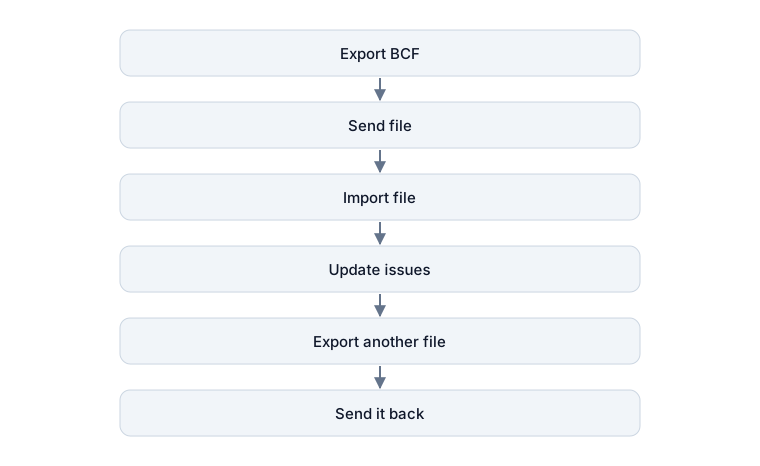
This works, but each exchange creates another snapshot. Someone must determine which copy is current.
BCF can also be used through a REST API. Compatible applications can connect to the same BCF service and work with shared topics, comments, viewpoints, and statuses. The difference is similar to exchanging spreadsheet attachments instead of working on one shared task board.
This approach is a natural fit for web applications, which are already built around network services and APIs. A model viewer, issue manager, reporting tool, or internal dashboard can connect to project information without trying to become the entire project platform.
Browser BIM is therefore not only about displaying 3D geometry online. It is also about allowing smaller, specialized tools to participate in connected information workflows.
Browser-based AEC software is already serving different purposes
The category now includes much more than model viewers.
Autodesk Forma uses the browser for early-stage and schematic design workflows. Trimble Connect provides browser access to project information and an interactive 3D viewer. Graphisoft BIMx Web allows published Hyper-models to be explored without installing a separate application. Open-source projects provide components for IFC parsing, visualization, issue management, and custom interfaces.
These tools are not all solving the same problem. They show that the browser can support different parts of an AEC workflow: model review, early design, coordination, field access, document control, reporting, validation, and organization-specific applications.
The browser is becoming popular not because every BIM function belongs there, but because enough useful functions now do.
Where browser-based BIM works best
A browser tool is often a strong fit when the task is clearly defined and the information needs to reach a broad group of users. Typical examples include:
- opening and navigating IFC models;
- checking object properties and classifications;
- creating sections and measurements;
- isolating systems, disciplines, or object groups;
- reviewing and updating BCF issues;
- presenting model information to non-authoring users;
- generating coordination reports;
- checking information from a site or temporary device;
- embedding model data into a larger web workflow;
- giving external participants controlled access to selected project information.
The common feature is not that these tasks are simple. It is that they do not require unrestricted access to the authoring model.
Where desktop BIM still has the advantage
Browser tools do not make desktop BIM obsolete.
Full authoring, detailed documentation, advanced parametric behavior, discipline-specific analysis, complex automation, specialist hardware integration, and highly demanding models still favor native applications in many workflows.
Desktop software also has deeper access to the operating system and local file environment. That matters for plugins, batch processing, linked files, company standards, custom scripts, and established network workflows.
Browsers have their own constraints. Performance depends on the device and browser engine. Memory is more restricted. Feature support varies. Offline behavior must be designed deliberately. Local browser data needs to be backed up. Cloud platforms introduce questions about access control, hosting, data residency, and long-term availability.
The practical conclusion is not that one environment will replace the other. It is that fewer tasks now require the full desktop environment.
The useful future is hybrid
BIM software is moving toward a more distributed structure.
Desktop applications remain the strongest environment for creating and deeply editing models. Cloud platforms coordinate shared project information. Browser tools provide direct access to specific workflows. Open standards and APIs allow information to move between them.

The browser does not need to reproduce every command in a BIM authoring application to change how BIM is used. It only needs to make the right information available when it is needed, through an interface suited to the task.
That is why browser-based BIM tools are becoming more popular. They are not replacing the model-authoring environment. They are reducing the distance between the model and the rest of the project.
Bimlyte follows this focused, local-first approach. It opens IFC models and manages BCF issues directly in the browser, without an installation or account, while processing project files on the user’s device rather than uploading them for processing.
Sources and further reading
- Bimlyte: Browser-based IFC viewer and BCF manager
- Bimlyte: Data privacy and local processing
- buildingSMART: Industry Foundation Classes
- buildingSMART: BIM Collaboration Format
- WebAssembly
- MDN: WebAssembly
- MDN: WebGL
- MDN: WebGPU
- MDN: Origin Private File System
- That Open Company: web-ifc
- Autodesk: Forma Building Design
- Trimble Connect for Browser
- Graphisoft: BIMx Web