What is a federated BIM model?
Quick answer: A federated BIM model is a combined view of several separate discipline models — such as architecture, structure and MEP — brought together in the correct position so the project can be reviewed as a whole. The original models are still maintained separately by the teams responsible for them.
A building is one project, but in BIM it is rarely created by one team in one model.
The architect may model walls, rooms and doors. The structural engineer works on columns, beams and slabs, while MEP teams develop ducts, pipes, cable trays and equipment. Each discipline can work independently, but at some point the project team needs to see how all of those systems fit together.
That combined view is the basic idea behind a federated BIM model.
One building, several models
Imagine a simple office building divided into several discipline models:
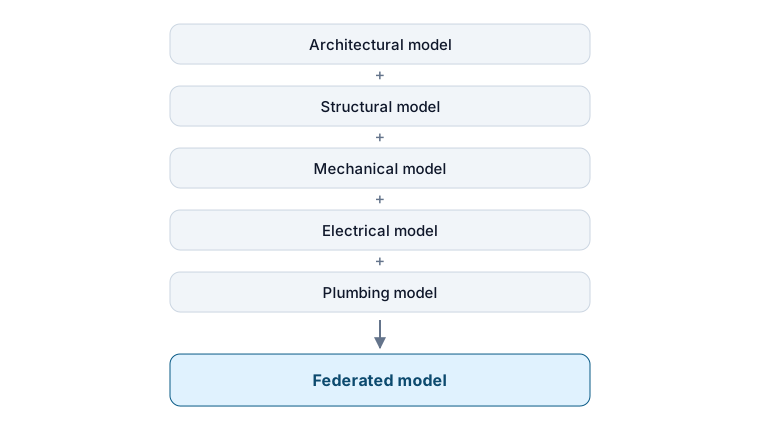
When these models are brought together, a reviewer can see the complete project in one place: a ventilation duct below a concrete beam, a cable tray beside it and the ceiling around both.
A useful way to picture this is with transparent sheets. One sheet contains the architecture, another the structure and another the building services. Each sheet makes sense on its own, but stacking them in the correct position reveals how the whole building works together.
Federation does the same thing digitally.
What does “federated” actually mean?
In BIM, federation means bringing separate models together for review or coordination without turning them into one shared editable source model.
The architectural team still maintains the architectural model, the structural team maintains the structural model, and the MEP teams remain responsible for their own systems. The federated environment simply loads or references those models together.
A federated model is therefore not necessarily a particular file type. It may be a coordination file, a cloud-based model set or several files opened together in a viewer. What matters is that the separate models are presented in one common project context.
This approach is useful because multidisciplinary projects rarely fit neatly into one authoring file. Different companies may use different software, publish updates at different times and remain responsible for different parts of the design. Federation gives the project team one combined view without changing that responsibility structure.
What is a federated BIM model used for?
The main purpose is coordination.
A discipline model can look perfectly reasonable on its own while still conflicting with another part of the project. Bring the models together and those relationships become much easier to see.
For example:
- a ventilation duct may cross a structural beam;
- a pipe may pass through a stair landing;
- an electrical cabinet may not have enough access space;
- a ceiling zone may be too shallow for the services above it;
- an opening expected by one discipline may be missing from another model.
A federated model can support several related tasks:
- model review — exploring the complete project instead of one discipline at a time;
- clash detection — finding geometric conflicts or missing clearances between models;
- coordination meetings — discussing issues while everyone is looking at the same combined context;
- construction and stakeholder review — helping people understand how the different parts of the project relate to one another.
Not every federation needs advanced clash detection. Sometimes the most useful thing it provides is simply context: the ability to see one discipline in relation to the others.
Is a federated model the same as a merged model?
Not quite.
A merged model suggests that information from several sources has been combined into a new model. A federated model keeps the discipline models separate and brings them together for a common view or coordination process.
The distinction matters because federation is primarily about coordination, not about creating a new authoring model.
A simple rule to remember is:
Combine for review. Keep the source models under their original ownership.
What happens when the team finds a problem?
Suppose the federated model shows a duct running through a structural beam. The coordinator can identify and document the issue in the combined model, but the actual design change normally happens in the responsible discipline model.
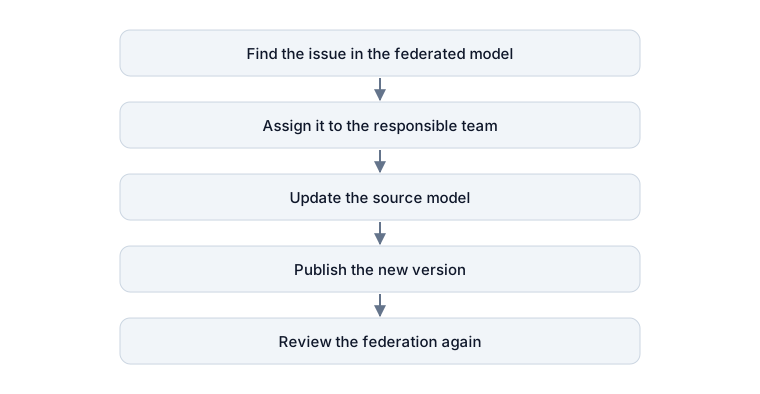
This workflow lets the coordination team work with the complete project while each discipline remains responsible for its own design.
BCF can help carry issues between review and authoring tools by storing topics, comments and viewpoints. Read IFC vs BCF: what’s the difference? for a simple explanation of how model exchange and issue exchange serve different purposes.
How do the models line up correctly?
A federation only works when the models are positioned consistently.
If the architectural model places the building in one location and the structural model places it somewhere else, loading them together will not automatically fix the difference. One model may appear shifted, rotated or hundreds of meters away.
For a beginner, the important idea is simple:
Every discipline needs to agree where the building is.
That is why project coordinates and model positioning are important in BIM. When they are set up consistently, separate models can be brought together in the intended location and reviewed as one project.
Where does IFC fit into federation?
A federated model does not have to use IFC. Many coordination platforms can also combine native or proprietary model formats.
IFC becomes especially useful when different disciplines use different authoring tools. An architect may work in Archicad, a structural engineer in Tekla and another consultant in Revit. Each team can publish an IFC model, and those files can then be reviewed together in a tool that supports IFC.
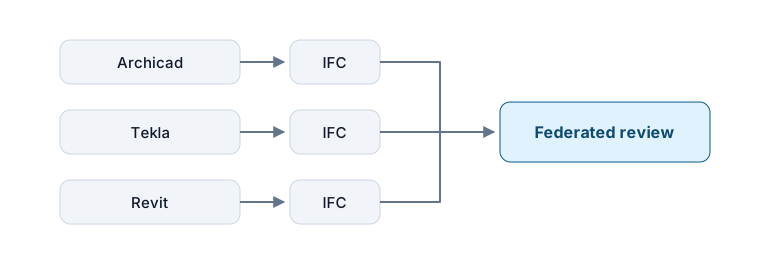
The teams do not need to use the same authoring application simply to view and coordinate their models together. That is one of the practical advantages of an openBIM workflow.
How are federated models kept up to date?
A federation is only as current as the models included in it.
When a discipline publishes a new version, the corresponding model in the federation needs to be refreshed or replaced. If the structural team has already issued a new model but the coordination environment still contains last week’s version, the combined view no longer represents the current project.
Good federation therefore depends on a clear publishing and revision process as much as it depends on the viewer or coordination software itself.
Do you need specialist software to view a federated model?
Not always.
Dedicated coordination applications are useful for advanced clash detection, automation and demanding project workflows. For general review, however, a user may only need to load several models together, switch disciplines on and off, create a section, inspect properties or open a saved issue.
Browser-based viewers can provide this lighter review layer without trying to replace full authoring or coordination software.
Bimlyte follows this approach. Multiple IFC models and BCF issues can be brought into the same project together with prepared views and selection sets, allowing a recipient to explore the federated project without editing the original discipline models.
The simplest way to remember it
A federated BIM model is one coordinated view of several discipline models.
The architect, structural engineer and MEP teams can continue working in their own models, while the project team gets a common environment for understanding how those models fit together, finding problems and discussing solutions.
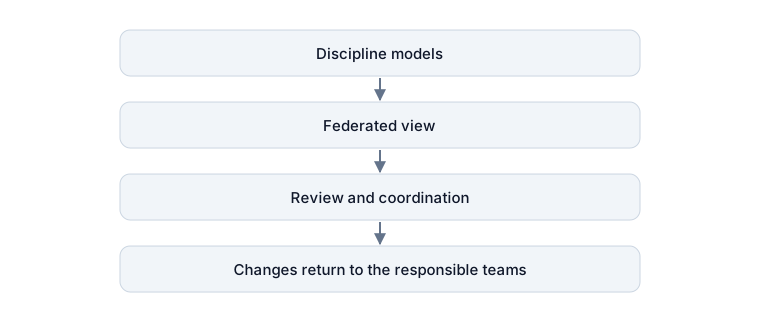
That is the core purpose of federation: to see the project as a whole without forcing the whole project into one authoring model.
You can open Bimlyte to load and review IFC models and BCF issues directly in your browser without installing specialist BIM authoring software or creating an account. Project files are processed locally on your device.